前言
在做java接口自动化中,我们常常需要依赖多个接口,A接口依赖B,C,D接口的响应作为请求参数;或者URL中的参数是从其他接口中提取返回值作获取参数这是必不可少的。那么怎么实现呢?下面就来介绍多业务依赖多接口的代码思路。
思路:
1、先new一个
HttpClientUtils
对象,构造一个
queryParam
的
Map
用来放请求参数 ,再构造 一个
headers
的Map用来放请求头
2、调用
get/post
请求 获得请求返回值
3、用
jsonpath
技术, 对A接口中的响应值
data
取出来
4、遍历获取到的
list
然后
for
循环每条数据
5、
close
关闭HttpClientUtils对象 释放资源
首先,我们来看下
getCategoryBookList
根据分类名称查询书籍接口 在
Controller
层代码实现如图所示
* 根据分类名称查询书籍
* @return
@GetMapping
(
"/getCategoryBookList"
)
@ResponseBody
public
CommonResponse
<
List
<
Book
>
>
getCategoryBookList
(
@RequestParam
(
value
=
"categoryName"
)
String
name
)
{
List
<
Book
>
categoryList
=
bookService
.
getCategoryBookList
(
name
)
;
CommonResponse
response
=
CommonResponse
.
successInstance
(
categoryList
)
;
return
response
;
CommonResponse
这个类 是与前端交互用的 因为这个类里面还有请求的statusCode msg
data,如果你想把
httpClient
调用接口的返回值 返给前端
就将返回值设置到CommonResponse的data中就行
@RequestParam(value = "categoryName")
如果是问号后面拼的参数 这个用@RequestParam来取,告诉
springboot
这个
name
对应的就是参数中的
categoryName
,就是说前端页面给你传的参数名叫
categoryName
但是你代码中写的变量名是
name
如果不加这个参数 是接收不到的 所以需要注解映射
CommonResponse.successInstance(categoryList)
通用返回值,返回成功
message
,返回数据
data
,返回总条数
count
其次,我们需要提取/
getCategoryBookList
接口返回的bookName值
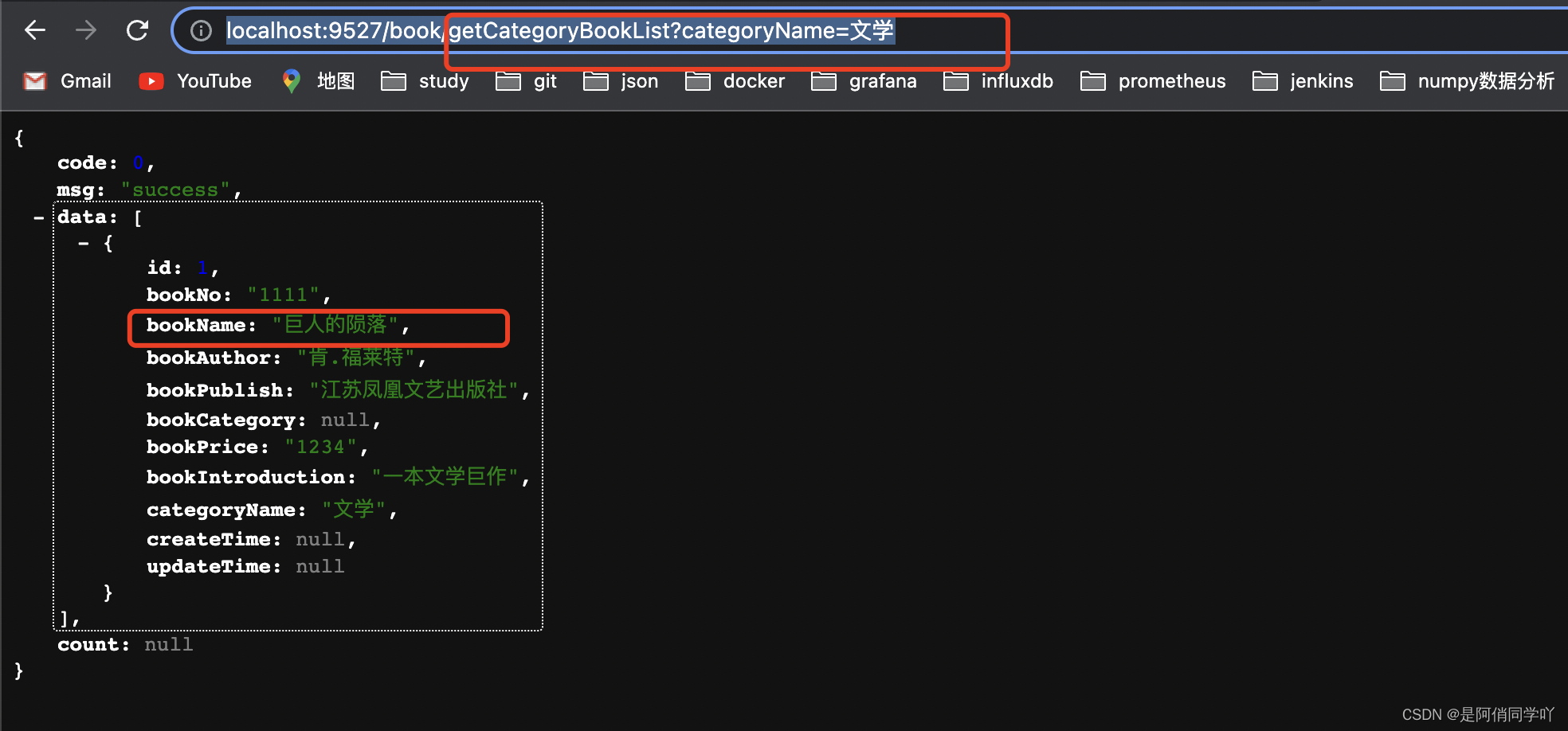
使用JsonPath提取,代码如下
    @GetMapping("/returnHttpGet")
    @ResponseBody
    public Commo
业务方要求一两个个字段也用json, 而之前字段太少我都用@RequestParam接收,不想改代码就自己实现一个
import java.lang.annotation.ElementType;
import java.lang.annotation.Retention;
import java.lang.annotation.RetentionPolicy;
import java.lang.annotation.Target;
@Target(ElementType.PARAMETER)
我们无法通过账号密码去访问客户的数据库,但是我们可以通过访问客户提供的
接口
去获取数据,因此,我们可以通过请求
接口
的方式,对
返回
的json数据进行解析,然后就能得到我们所需要的数据。
通过配置文件的方式配置所需要信息,增强灵活性
请求到的数据,如果在数据库存在就更新,不存在就插入
如果json中某个数据不存在,则自动补全,并且置为空
值
,存入数据库中
返回
的数据如果存在时间戳,需要进行解析再存入到数据库中
Httpclient
:发送http请求
jsonPath
Ok
HttpClient
请求及
返回
值
获取
Ok
HttpClient
client = new Ok
HttpClient
().newBuilder()
.build();
MediaType mediaType = MediaType.parse("application/x-www-form-urlencoded");
RequestBody body = RequestBody.create(mediaType, "source=clm&docType=doc&srcPath=htt
jmeter实现
接口
关联的两种方式:正则表达式
提取
器和json
提取
器看这篇就够了
在开展
接口
测试或者是
接口
面试的过程中,我们会发现很多
接口
需要依赖前面的
接口
,需要我们动态从前面的
接口
返回
中
提取
数据,也就是我们通常说的关联。
关联通俗来讲就是把上一次请求的
返回
内容中的部分截取出来保存为
参数
,用来传递给下一个请求使用。
二、使用正则表达式
提取
器实现
接口
关联
正则表达式
提取
器,见名知意就是使用正则表达式的方法把我们需要
提取
的内容通配出来。
原理:通过左右二边不变的边界来
提取
中间变的
返回
值
如上图:需要提
<dependency>
<groupId>com.fasterxml.jackson.core</groupId>
<artifactId>jackson-databind</artifactId>
</dependency>
2. 创建
HttpClient
实例
```java
@Configuration
public class
HttpClient
Config {
@Bean
public Closeable
HttpClient
httpClient
() {
return
HttpClient
s.createDefault();
@Bean
public
HttpClient
Service
httpClient
Service(Closeable
HttpClient
httpClient
) {
return new
HttpClient
Service(
httpClient
);
3. 创建
HttpClient
Service类
```java
public class
HttpClient
Service {
private final Closeable
HttpClient
httpClient
;
public
HttpClient
Service(Closeable
HttpClient
httpClient
) {
this.
httpClient
=
httpClient
;
public String get(String url) throws IOException {
HttpGet httpGet = new HttpGet(url);
CloseableHttpResponse response =
httpClient
.execute(httpGet);
try {
HttpEntity entity = response.getEntity();
if (entity != null) {
return EntityUtils.toString(entity);
} finally {
response.close();
return null;
4. 创建Weather类
```java
public class Weather {
private String date;
private String week;
private String weather;
private String temp;
private String humidity;
private String wind;
// getter and setter
5. 创建WeatherService类
```java
@Service
public class WeatherService {
private final
HttpClient
Service
httpClient
Service;
public WeatherService(
HttpClient
Service
httpClient
Service) {
this.
httpClient
Service =
httpClient
Service;
public List<Weather> getWeather(String city) throws IOException {
String url = "http://wthrcdn.etouch.cn/weather_mini?city=" + city;
String json =
httpClient
Service.get(url);
ObjectMapper mapper = new ObjectMapper();
JsonNode rootNode = mapper.readTree(json);
JsonNode dataNode = rootNode.path("data");
List<Weather> weatherList = new ArrayList<>();
for (JsonNode node : dataNode.path("forecast")) {
Weather weather = mapper.treeToValue(node, Weather.class);
weatherList.add(weather);
return weatherList;
6. 测试WeatherService
```java
@RestController
public class WeatherController {
private final WeatherService weatherService;
public WeatherController(WeatherService weatherService) {
this.weatherService = weatherService;
@GetMapping("/weather")
public List<Weather> getWeather(@RequestParam String city) throws IOException {
return weatherService.getWeather(city);
现在,你可以通过访问http://localhost:8080/weather?city=北京来获取北京的天气预报信息。