




To fix the “cannot find name ‘it'” Jest error, install the type definitions for Jest with
npm i -D @types/jest
and add them to the
types
array in your
tsconfig.json
file.
This error occurs when you try to use the
it()
function from Jest in a TypeScript file, but TypeScript cannot find the type definitions for the package.
Here is an example of the error occurring in Visual Studio Code:
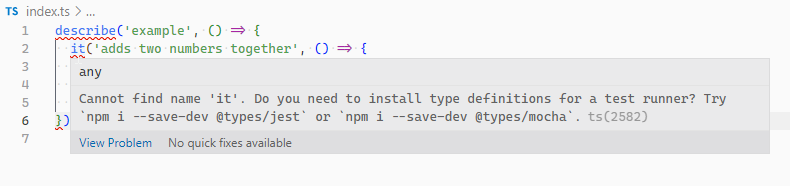
index.ts
// Cannot find name 'it'. Do you need to install type
// definitions for a test runner? Try
// `npm i --save-dev @types/jest` or
// `npm i --save-dev @types/mocha`. ts(2582)
describe('example', () => {
  it('adds two numbers together', () => {
    expect(2 + 2).toBe(4);
Install the type definitions for Jest by running the following command in a terminal at the root directory of your project:
npm i -D @types/jestIf you didn’t already have Jest installed, you can install it with the type definitions in one command:
npm i -D @types/jest jest
Add typings to
tsconfig.json
types
array
In some cases, this is all you need to do and the error will stop. But if it persists, you’ll need to add
jest
to the
types
array in your
tsconfig.json
file, so it looks something like this:
tsconfig.json
{
  "compilerOptions": {
    "types": [
      // ... other types
      "jest"
    // ..other settings
Include test files
If the error still doesn’t go away, ensure that TypeScript does not ignore the directory containing your test files. If you’ve set the
include
array in your
tsconfig.json
file, ensure the patterns specified in this array match the directory where your test files are located.
For example, if your tests are located in a src directory, TypeScript will detect them with a configuration like this:
tsconfig.json
{
  "compilerOptions": {},
  "include": ["src/**/*"],
}
But if they’re located in a tests directory, we’ll need to add an additional glob pattern to make TypeScript detect them:
tsconfig.json
{
  "compilerOptions": {},
  "include": [
    "src/**/*",
    "tests/**/*"
}
We can also include glob patterns to match test files with a specific ending or extension. For example, we can include all files ending with “.spec.ts” and “.test.ts” with the following configuration:
tsconfig.json
{
  "compilerOptions": {},
  "include": [